

Speed and Savings: Caching Database Queries with Prisma

Query caching stores the result of a database read so repeated requests are served from the cache instead of hitting your database: faster responses, lower database load, and infrastructure that survives traffic spikes. This post covers why and when to cache, and where a cache for Prisma ORM queries belongs today.
Prisma Postgres has no query cache of its own. The cacheStrategy option on Prisma ORM queries works against a Prisma Postgres database only when your app connects through a hosted Prisma Accelerate connection with @prisma/extension-accelerate, and Accelerate, including those hosted connections, will be retired on December 1, 2026. Direct, pooled, and serverless driver connections to Prisma Postgres do not cache. To cache reads, keep the results in your application's memory. Prisma ORM 8, which is a release candidate, ships a first-party cache middleware that does this per query.
Updated (September 2026): This post first covered query caching through Prisma Accelerate. A July 2026 revision described that caching as part of Prisma Postgres, which was wrong, and this version corrects it. If your app uses
cacheStrategywith Prisma Postgres, follow Connect to Prisma Postgres without Accelerate before December 1, 2026. If it uses Accelerate with another database, follow Keep your existing database. Neither path keeps query caching, so the post now covers caching in your application.
Picture this: you and your team just released your latest app, SuperWidget. Everyone is excited, and you're pretty sure it's going to be a hit... and it is! SuperWidget is suddenly used by every major company in the world. However, you quickly realize that the level of traffic far outweighs what you planned for, and your app is starting to have degraded performance.
To solve this, your team jumps into action. You dive into your application monitoring and realize that several queries in your application have a much larger impact than anticipated. After a long night, your team implements a number of infrastructure improvements, most notably a caching layer, which takes the load off the rest of your infrastructure. SuperWidget performance recovers, and your new customers are happy with their experience.
So, what could you and your team have done better?
While your team was capable, fire drills and all-nighters are the last thing you want. The solution still required a coordinated effort and a lot of engineering hours. If you measure your hottest queries early and cache the ones that can tolerate slightly old data before the traffic arrives, you avoid most of that scramble.
Why you should cache database queries
As the example shows, caching helps when you need to reduce database or application load. By caching, you remove expensive operations from the time it takes to load your application, also known as the "critical path". Subsequent requests use the cached data and avoid spending app or database time computing the result. Reduced load also means your infrastructure can support a higher workload, or your app can run on smaller hardware, which saves money.
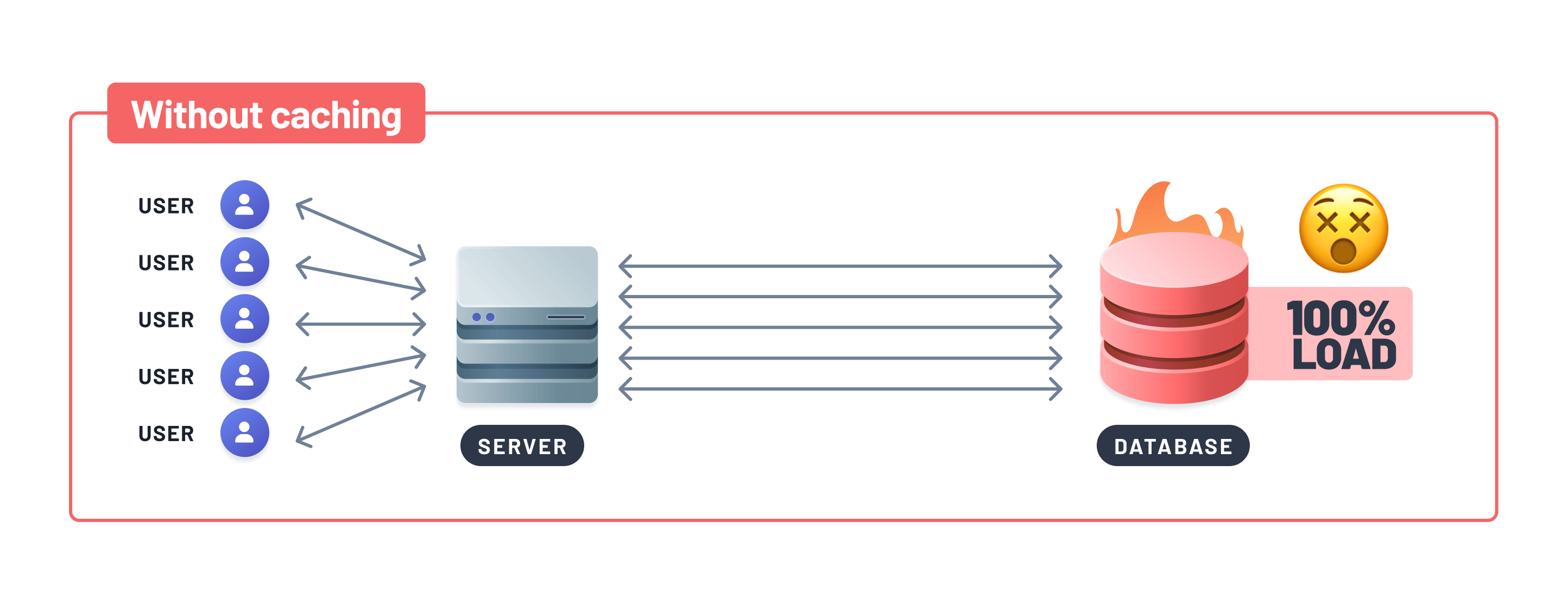
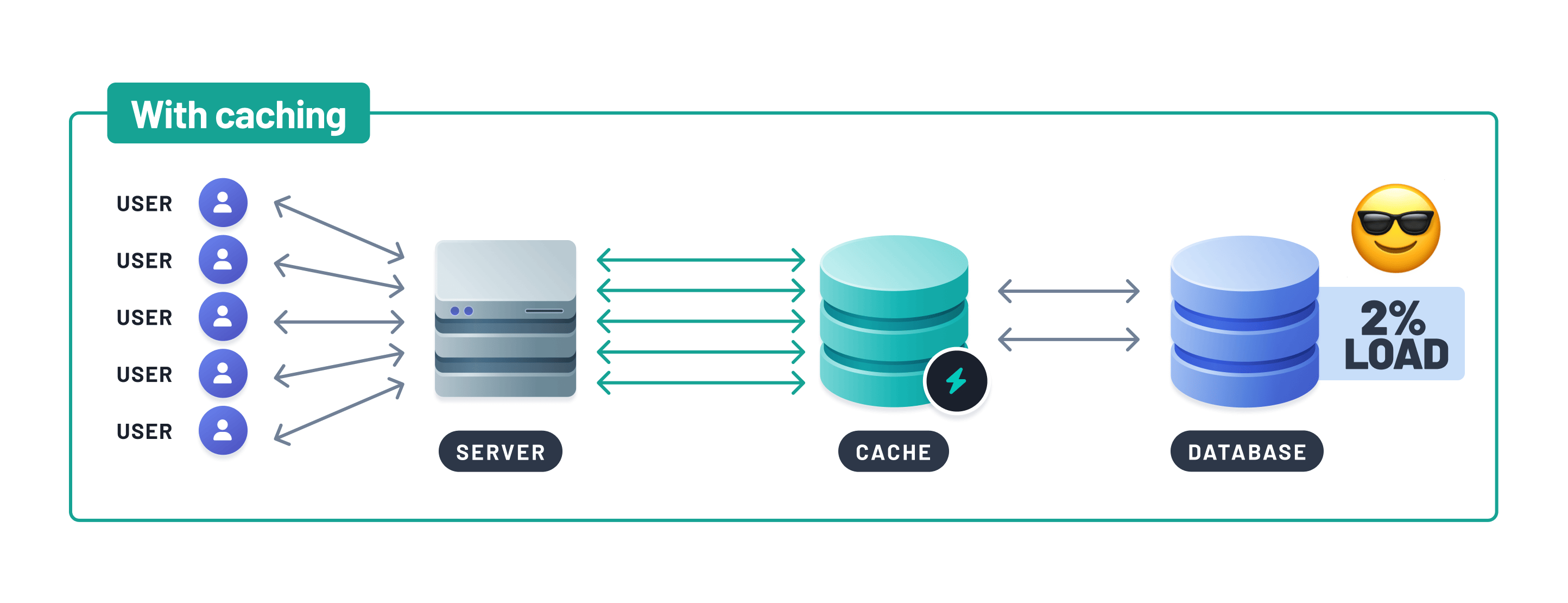
Another common reason to cache is egress cost: many cloud database providers charge for data leaving their service, so serving repeated reads from a cache cuts that line item. (On Prisma Postgres, egress is included on every plan, so the motivation there is speed and load rather than transfer fees.)
Faster load times and reduced costs lead to a third benefit: improved perception of your application. Quicker loads make a more enjoyable experience, and an app that feels sluggish leads to users spamming refresh at best and leaving for good at worst.
Where to cache Prisma ORM queries
Because Prisma Postgres does not cache query results, the cache belongs in your application. The simplest version keeps recent results in the memory of your app process, stored under the query and its parameter values with an expiry time, and answers repeat reads from there until that time runs out. This is what we recommend when a team needs caching. For almost all of those teams, running the app on Prisma Compute, next to its Prisma Postgres database, and caching in memory is enough.
In Prisma ORM 8, the cache middleware does this for you. You register createCacheMiddleware() on your client once, then opt each read in with a cache annotation that sets a TTL in milliseconds. Reads without an annotation go to the database as they did before, and writes are never cached:
import { cacheAnnotation } from '@prisma/orm-extension-middleware-cache';
import { db } from './db'; // client created with middleware: [createCacheMiddleware()]

export async function getUserCached(id: number) {
  return db.orm.public.User.first({ id }, (meta) =>
    meta.annotate(cacheAnnotation({ ttl: 60_000 })), // reuse these rows for 60 seconds
  );
}
The middleware is part of Prisma ORM, not Prisma Postgres. By default it keeps rows in the memory of one process, and it works with PostgreSQL and MongoDB databases from any provider. Prisma ORM 8 is a release candidate, with the final release expected in October 2026, and the cache middleware docs cover setup, cache keys, and options. The middleware and the db.orm query in the example need the Prisma ORM 8 client, so they do not work with Prisma Client in Prisma ORM 6 or 7. On those versions, keep results in an in-memory store of your own, as described above.
ttl (time to live) controls how long a result is served as fresh. Stale-while-revalidate (SWR) extends that with a window in which the cache still serves the stale result while it refreshes in the background, so users get fast responses even at the moment the data expires. Accelerate's cacheStrategy takes both a ttl and an swr value until Accelerate is retired on December 1, 2026. The Prisma ORM 8 cache middleware has a ttl but no stale-while-revalidate option, so the first read after an entry expires goes to the database.
When to cache
Now that you know why and how to cache, you may be tempted to cache every query. Before you do, note what happened in the example: the team monitored the application before implementing caching.
Caching is a trade, and any addition can incur a cost or cause unintended side effects. At Prisma, we're big fans of observability-driven development: instrument your app and make informed decisions. If a query must always return exactly up-to-date data, caching is probably the wrong fit. Data that changes rarely, or that tolerates a short staleness window, is a great fit.
This isn't to say you need production traffic before caching anything. Caching helps during development too: if automated tests reveal a slow query, cache it and measure the difference. Regardless of environment, the advice is the same: measure and benchmark, make a change, then measure again.
What an in-memory cache saves you, and what it costs
Because caching is decided per query, the rest of your application continues to run as-is, and you can adopt it one hot spot at a time. A cache in your app's memory also means there is no cache service to run, whereas a managed key-value store still leaves you inserting data and managing replication.
The cost is that each process has its own cache. With the Prisma ORM 8 middleware's built-in store, two instances of your app fill their caches separately and can return different rows for the same read, and every deploy starts them empty. Writes do not clear stored entries either, so a read with a 60-second TTL can return old rows for up to a minute after a change. If every instance must read the same entries, the middleware accepts a store of your own, which its docs describe.
Workloads where query caching shines
- Static content, such as blog posts
- Complex queries, such as usage calculation for billing tasks
- Read-heavy applications, such as social media platforms, news aggregators, and e-commerce sites
Per-query caching also suits teams that onboard engineers often: because the cache setting is written on the query itself, a new team member can see exactly what is cached and for how long by reading the code.
Frequently asked questions
No, Prisma Postgres has no query cache of its own. The cacheStrategy option works against a Prisma Postgres database only through a hosted Prisma Accelerate connection with @prisma/extension-accelerate, and Accelerate, including those connections, will be retired on December 1, 2026. Direct, pooled, and serverless driver connections do not cache, and query caching is not on Prisma's immediate roadmap for Prisma Postgres. To cache reads, keep the results in your application's memory, which the cache middleware in Prisma ORM 8, a release candidate, does per query.
Remove it before December 1, 2026. For a Prisma Postgres database, Connect to Prisma Postgres without Accelerate replaces the hosted Accelerate connection with pooled TCP or the Prisma Postgres serverless driver. For any other database, follow Keep your existing database. Neither path keeps query caching, so the queries that used cacheStrategy run against your database afterward. Measure that extra load before you switch production traffic, and move the reads that need a cache into your application's memory. On Prisma ORM 6 or 7, use an in-memory store of your own for that, because the cache middleware works only with the Prisma ORM 8 client.
No, it is part of Prisma ORM 8, which is a release candidate. By default it keeps rows in the memory of your app process, you turn it on for each query you want cached, and it works with PostgreSQL and MongoDB databases from any provider, Prisma Postgres included.
ttl is how long a cached result is served as fresh. swr extends that with a window where the stale result is still served instantly while the cache revalidates in the background. TTL alone means a slow refresh hits one unlucky request; adding SWR keeps responses fast through the refresh at the cost of briefly staler data. Accelerate's cacheStrategy takes both values until Accelerate is retired on December 1, 2026. The Prisma ORM 8 cache middleware has a ttl but no swr option.
When the query must always reflect the latest write: think balances, inventory checks at checkout, or permission lookups. Caching serves a previous result for its freshness window, so anything where a stale read causes incorrect behavior should stay uncached, and anything tolerant of a short delay is a candidate.
Wrapping up
Caching remains one of the genuinely hard problems of software engineering. Caching more things won't solve problems by itself; a team needs to understand what can be cached and how it impacts their product.
Prisma Postgres does not cache query results, so the cache is part of your application. Measure your hottest queries, cache in your app's memory the ones that can tolerate slightly old data, and then measure again. If your app uses cacheStrategy today, plan its removal before December 1, 2026, with Connect to Prisma Postgres without Accelerate on Prisma Postgres or Keep your existing database on any other database.
Looking ahead: Prisma ORM 8 is a TypeScript-native rewrite of Prisma ORM, built for AI coding agents. It is available as a release candidate, with the final release expected in October 2026, and it ships the cache middleware described above. Prisma ORM 7 remains fully supported; its docs are at prisma.io/docs/orm/v7. To start with Prisma ORM 8, run npm create prisma@latest or read the Prisma ORM 8 docs.
Keep reading

Prisma 6.9.0: Rust-Free ORM in Preview, Connect To Prisma Postgres With Any Tool, & More
Explore Prisma 6.9.0: Connect any tool to Prisma Postgres (Drizzle, Kysely, etc.), try the new Rust-free Prisma ORM for PostgreSQL & SQLite, run local Prisma Postgres with persistent data, and manage databases via a new VS Code UI.


Prisma Ambassador Program — Building A Community of Experts
We are thrilled to announce the launch of the Ambassador Program to empower the Prisma community, while also helping individual contributors build their own brand.


Build your next app with Prisma
Start free. Scale when you’re ready.