# Building a REST API with NestJS and Prisma: Error Handling
URL: https://www.prisma.io/blog/nestjs-prisma-error-handling-7D056s1kOop2
Published: 2022-12-14
Updated: 2026-07-08
Authors: Tasin Ishmam
Tags: education
Series: Building a REST API with NestJS, PostgreSQL, Swagger and Prisma
Description: Learn how to handle Prisma errors in a NestJS REST API: throw exceptions in controllers and build an exception filter for Prisma error codes like P2002. Updated for Prisma ORM 7 and NestJS 11.
6 min read
Error handling in NestJS happens at two levels: you throw HTTP exceptions like `NotFoundException` directly in your route handlers, and you catch everything else with exception filters. This tutorial is the third part of a five-part series on building a REST API with NestJS and Prisma ORM. In it, you will return a proper 404 for missing articles and build an exception filter that turns Prisma's `P2002` unique constraint error into a 409 Conflict response.
> **Updated (July 2026):** This tutorial has been fully revised for **Prisma ORM 7** and **NestJS 11**, and continues from the updated [first](https://www.prisma.io/blog/nestjs-prisma-rest-api-7D056s1BmOL0) and [second](https://www.prisma.io/blog/nestjs-prisma-validation-7D056s1kOla1) parts of the series. In Prisma 7 the `Prisma` namespace (including error classes like `PrismaClientKnownRequestError`) is imported from your generated Client instead of `@prisma/client`. Every command and code block below was run end-to-end against `prisma@7.8`, `@prisma/client@7.8` and `@nestjs/core@11`.
## Introduction [#introduction]
In the [first chapter](https://www.prisma.io/blog/nestjs-prisma-rest-api-7D056s1BmOL0) of this series, you created a new NestJS project and integrated it with Prisma ORM, PostgreSQL and Swagger. Then, you built a rudimentary REST API for the backend of a blog application. In the [second chapter](https://www.prisma.io/blog/nestjs-prisma-validation-7D056s1kOla1) you learned how to do input validation and transformation.
In this chapter you will learn how to handle errors in NestJS. You will look at two different strategies:
1. First, you will learn how to detect and throw errors directly in your application code inside the controllers of your API.
2. Next, you will learn how to use an [exception filter](https://docs.nestjs.com/exception-filters) to process unhandled exceptions throughout your application.
This tutorial continues from the end of the [second chapter](https://www.prisma.io/blog/nestjs-prisma-validation-7D056s1kOla1). Only the first chapter is strictly required; if you skipped the second one, your route handlers will still accept the `id` parameter as a `string` and cast it with `+id`, but the error handling techniques below work the same way.
### Development environment [#development-environment]
To follow along with this tutorial, you will be expected to:
* ... have [Node.js](https://nodejs.org) (v18 or higher) installed.
* ... have a PostgreSQL database. The easiest option is [Prisma Postgres](https://www.prisma.io/docs/postgres); you can also run Postgres locally with [Docker](https://www.docker.com/) or a native install.
* ... have the [Prisma VSCode Extension](https://marketplace.visualstudio.com/items?itemName=Prisma.prisma) installed. *(optional)*
* ... have access to a Unix shell (like the terminal/shell in Linux and macOS) to run the commands provided in this series. *(optional)*
> **Note**: If you don't have a Unix shell (for example, you are on a Windows machine), you can still follow along, but the shell commands may need to be modified for your machine.
### Set up the project [#set-up-the-project]
The starting point for this tutorial is the ending of [part two](https://www.prisma.io/blog/nestjs-prisma-validation-7D056s1kOla1) of this series: the Median REST API built with NestJS 11 and Prisma ORM 7, including input validation. If you're jumping in here, work through the earlier parts first; each one builds directly on the previous.
Before continuing, make sure the project runs:
1. Start the development server:
```shell
npm run start:dev
```
2. Confirm the API documentation is available at [`http://localhost:3000/api/`](http://localhost:3000/api/).
> **Note**: The original edition of this series linked to a companion GitHub repository. That repository still targets the older Prisma 4 and NestJS 8 stack, so for the updated series you should continue from your own project.
### Project structure and files [#project-structure-and-files]
Your project should have the following structure:
```
median
├── node_modules
├── generated
│ └── prisma
├── prisma
│ ├── migrations
│ ├── schema.prisma
│ └── seed.ts
├── src
│ ├── app.module.ts
│ ├── main.ts
│ ├── articles
│ └── prisma
├── test
│ ├── app.e2e-spec.ts
│ └── jest-e2e.json
├── README.md
├── .env
├── eslint.config.mjs
├── nest-cli.json
├── package-lock.json
├── package.json
├── prisma.config.ts
├── tsconfig.build.json
└── tsconfig.json
```
The notable files and directories in this repository are:
* The `src` directory contains the source code for the application. There are three modules:
* The `app` module is situated in the root of the `src` directory and is the entry point of the application. It is responsible for starting the web server.
* The `prisma` module contains `PrismaService`, your interface to the database.
* The `articles` module defines the endpoints for the `/articles` route and accompanying business logic.
* The `prisma` directory contains the `schema.prisma` file (database schema), the `migrations` directory (migration history) and the `seed.ts` script.
* The `generated/prisma` directory contains the generated Prisma Client, which in Prisma 7 lives in your project instead of `node_modules`.
* The `prisma.config.ts` file is Prisma's central configuration file, and `.env` contains the `DATABASE_URL` connection string.
> **Note**: For more information about these components, go through [part one](https://www.prisma.io/blog/nestjs-prisma-rest-api-7D056s1BmOL0) of this tutorial series.
## Detect and throw exceptions directly [#detect-and-throw-exceptions-directly]
This section will teach you how to throw exceptions directly in your application code. You will address an issue in the `GET /articles/:id` endpoint. Currently, if you provide this endpoint with an `id` value that does not exist, it will return nothing with an HTTP `200` status instead of an error.
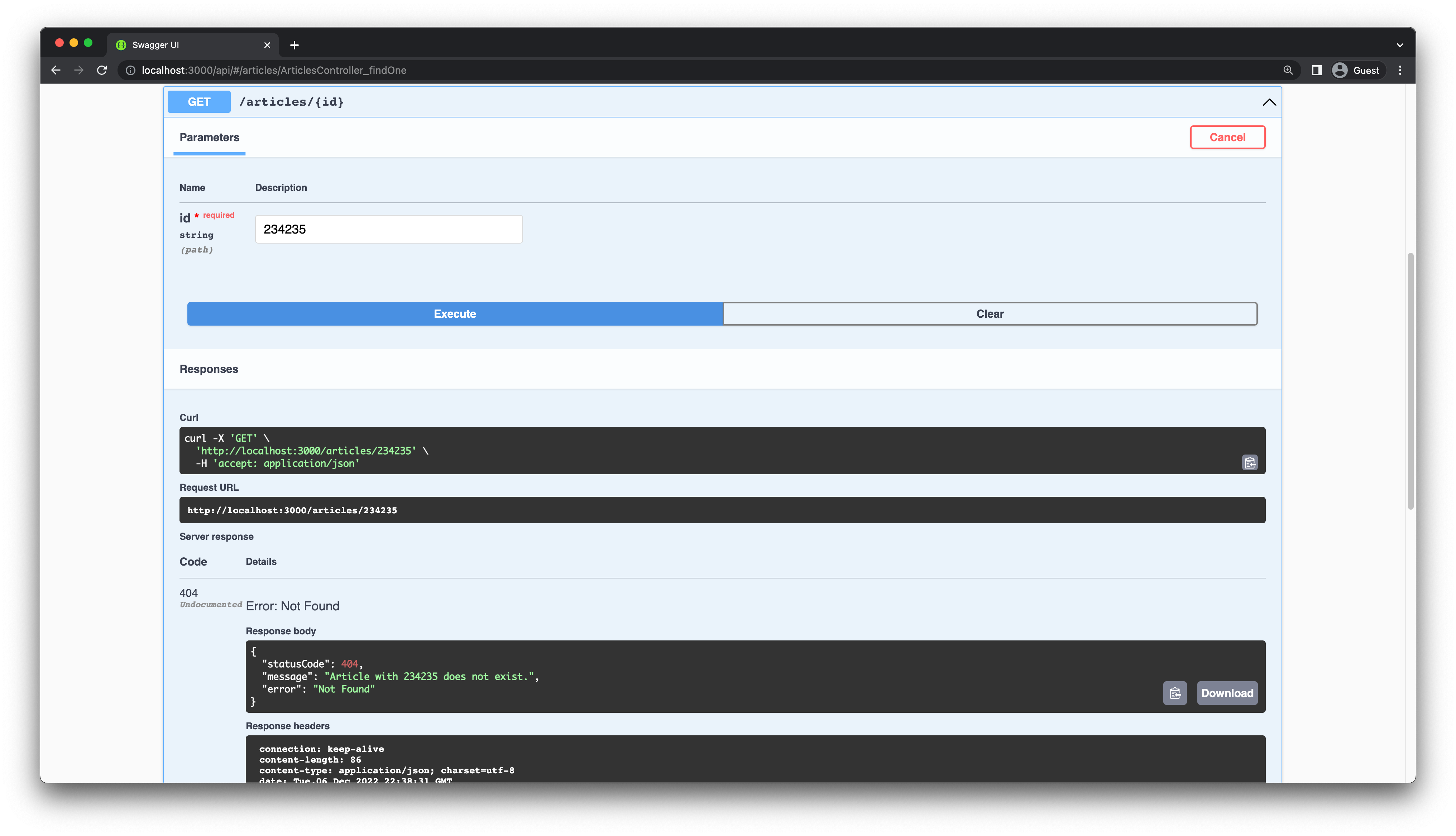
For example, try making a `GET /articles/234235` request. You get a `200` response with an empty body, which is misleading for API consumers.
To fix this, you have to change the `findOne` method in `articles.controller.ts`. If the article does not exist, you will throw a `NotFoundException`, a built-in exception provided by NestJS.
Update the `findOne` method in `articles.controller.ts`:
```ts
// src/articles/articles.controller.ts
import {
Controller,
Get,
Post,
Body,
Patch,
Param,
Delete,
ParseIntPipe,
NotFoundException,
} from '@nestjs/common';
@Get(':id')
@ApiOkResponse({ type: ArticleEntity })
async findOne(@Param('id', ParseIntPipe) id: number) {
const article = await this.articlesService.findOne(id);
if (!article) {
throw new NotFoundException(`Article with ${id} does not exist.`);
}
return article;
}
```
The route handler is now `async` and awaits the result of the service call, so it can inspect the result before returning it. If you make that same request again, you should get a user friendly error message:
```json
{
"message": "Article with 234235 does not exist.",
"error": "Not Found",
"statusCode": 404
}
```
## Handle exceptions by using exception filters [#handle-exceptions-by-using-exception-filters]
### Advantages of a dedicated exception layer [#advantages-of-a-dedicated-exception-layer]
You detected an error state in the previous section and manually threw an exception. In many cases, an exception will automatically be generated by your application code. In such cases, you should process the exception and return an appropriate HTTP error to the user.
While it's possible to handle exceptions case by case in each controller manually, it is not a good idea for many reasons:
* It will clutter your core application logic with a lot of error handling code.
* Many of your endpoints will deal with similar errors, such as a resource not being found. You will have to duplicate the same error handling code in many places.
* It would be hard to change your error handling logic since it is scattered across many locations.
To solve these issues, NestJS has an [exception layer](https://docs.nestjs.com/exception-filters) which is responsible for processing unhandled exceptions across your application. In NestJS, you can create *exception filters* that define how to handle different kinds of exceptions thrown inside your application.
### NestJS global exception filter [#nestjs-global-exception-filter]
NestJS has a global exception filter, which catches all unhandled exceptions. To understand the global exception filter, let's look at an example. Send *two* requests to the `POST /articles` endpoint with the following body:
```json
{
"title": "Let's build a REST API with NestJS and Prisma.",
"description": "NestJS Series announcement.",
"body": "NestJS is one of the hottest Node.js frameworks around. In this series, you will learn how to build a backend REST API with NestJS, Prisma, PostgreSQL and Swagger.",
"published": true
}
```
The first request will succeed, but the second request will fail because you already created an article with the same `title` field. You will get the following error:
```json
{
"statusCode": 500,
"message": "Internal server error"
}
```
If you take a look at the terminal window running your NestJS server, you should see the following error:
```
[Nest] 9112 - 07/08/2026, 10:33:41 AM ERROR [ExceptionsHandler] PrismaClientKnownRequestError:
Invalid `this.prisma.article.create()` invocation in
~/median/src/articles/articles.service.ts:11:32
8 constructor(private prisma: PrismaService) {}
9
10 create(createArticleDto: CreateArticleDto) {
→ 11 return this.prisma.article.create(
Unique constraint failed on the fields: (`title`)
at ... {
code: 'P2002',
...
}
```
From the logs you can see that Prisma Client throws a unique constraint validation error because of the `title` field, which is marked as `@unique` in the Prisma schema. The exception is of type `PrismaClientKnownRequestError` and is exported at the `Prisma` namespace level of your generated Client.
Since the `PrismaClientKnownRequestError` is not being handled directly by your application, it is automatically processed by the built-in global exception filter. This filter generates the HTTP `500` "Internal Server Error" response.
### Create a manual exception filter [#create-a-manual-exception-filter]
In this section, you will create a custom exception filter to handle the `PrismaClientKnownRequestError` that you saw. This filter will catch all exceptions of type `PrismaClientKnownRequestError` and return a clear user friendly error message to the user.
Start by generating a filter class by using the Nest CLI:
```shell
npx nest generate filter prisma-client-exception
```
This will create a new file `src/prisma-client-exception/prisma-client-exception.filter.ts` with the following content:
```ts
// src/prisma-client-exception/prisma-client-exception.filter.ts
import { ArgumentsHost, Catch, ExceptionFilter } from '@nestjs/common';
@Catch()
export class PrismaClientExceptionFilter implements ExceptionFilter {
catch(exception: T, host: ArgumentsHost) {}
}
```
> **Note**: There is a second file created called `src/prisma-client-exception/prisma-client-exception.filter.spec.ts` for creating tests. You can ignore this file for now.
You will get an error from `eslint` since the `catch` method is empty. Update the `catch` method implementation in `PrismaClientExceptionFilter` as follows:
```ts
// src/prisma-client-exception/prisma-client-exception.filter.ts
import { ArgumentsHost, Catch } from '@nestjs/common';
import { BaseExceptionFilter } from '@nestjs/core';
import { Prisma } from '../../generated/prisma/client';
@Catch(Prisma.PrismaClientKnownRequestError) // 1
export class PrismaClientExceptionFilter extends BaseExceptionFilter { // 2
catch(exception: Prisma.PrismaClientKnownRequestError, host: ArgumentsHost) {
console.error(exception.message); // 3
// default 500 error code
super.catch(exception, host);
}
}
```
Here you have made the following changes:
1. To ensure that this filter catches exceptions of type `PrismaClientKnownRequestError`, you added it to the `@Catch` decorator. Note the import: in Prisma 7, the `Prisma` namespace comes from your generated Client (`../../generated/prisma/client`), the same import path you used for the `Article` type in part one. Importing it from `@prisma/client` no longer works.
2. The exception filter extends the `BaseExceptionFilter` class from the NestJS core package. This class provides a default implementation for the `catch` method that returns an "Internal server error" response to the user. You can learn more about this [in the NestJS docs](https://docs.nestjs.com/exception-filters#inheritance).
3. You added a `console.error` statement to log the error message to the console. This is useful for debugging purposes.
Prisma throws the `PrismaClientKnownRequestError` for many different kinds of errors. So you will need to figure out how to extract the error code from the `PrismaClientKnownRequestError` exception. The `PrismaClientKnownRequestError` exception has a `code` property that contains the error code. You can find the list of error codes in the [Prisma error message reference](https://www.prisma.io/docs/orm/v7/reference/error-reference).
The error code you are looking for is `P2002`, which occurs for unique constraint violations. You will now update the `catch` method to throw an HTTP `409 Conflict` response in case of this error. You will also provide a custom error message to the user.
Update your exception filter implementation like this:
```ts
// src/prisma-client-exception/prisma-client-exception.filter.ts
import { ArgumentsHost, Catch, HttpStatus } from '@nestjs/common';
import { BaseExceptionFilter } from '@nestjs/core';
import { Prisma } from '../../generated/prisma/client';
import { Response } from 'express';
@Catch(Prisma.PrismaClientKnownRequestError)
export class PrismaClientExceptionFilter extends BaseExceptionFilter {
catch(exception: Prisma.PrismaClientKnownRequestError, host: ArgumentsHost) {
console.error(exception.message);
const ctx = host.switchToHttp();
const response = ctx.getResponse();
const message = exception.message.replace(/\n/g, '');
switch (exception.code) {
case 'P2002': {
const status = HttpStatus.CONFLICT;
response.status(status).json({
statusCode: status,
message: message,
});
break;
}
default:
// default 500 error code
super.catch(exception, host);
break;
}
}
}
```
Here you are accessing the underlying framework `Response` object and directly modifying the response. By default, [express](https://expressjs.com/) is the HTTP framework used by NestJS under the hood. For any exception code besides `P2002`, you are sending the default "Internal server error" response.
> **Note**: For production applications, be careful to not leak any sensitive information to the user in the error message.
### Apply the exception filter to your application [#apply-the-exception-filter-to-your-application]
Now, for the `PrismaClientExceptionFilter` to come into effect, you need to apply it to a certain scope. An exception filter can be scoped to individual routes (method-scoped), entire controllers (controller-scoped) or across the entire application (global-scoped).
Apply the exception filter to your entire application by updating the `main.ts` file:
```ts
// src/main.ts
import { HttpAdapterHost, NestFactory } from '@nestjs/core';
import { AppModule } from './app.module';
import { SwaggerModule, DocumentBuilder } from '@nestjs/swagger';
import { ValidationPipe } from '@nestjs/common';
import { PrismaClientExceptionFilter } from './prisma-client-exception/prisma-client-exception.filter';
async function bootstrap() {
const app = await NestFactory.create(AppModule);
app.useGlobalPipes(new ValidationPipe({ whitelist: true }));
const config = new DocumentBuilder()
.setTitle('Median')
.setDescription('The Median API description')
.setVersion('0.1')
.build();
const document = SwaggerModule.createDocument(app, config);
SwaggerModule.setup('api', app, document);
const { httpAdapter } = app.get(HttpAdapterHost);
app.useGlobalFilters(new PrismaClientExceptionFilter(httpAdapter));
await app.listen(process.env.PORT ?? 3000);
}
bootstrap();
```
The `HttpAdapterHost` is needed because the `BaseExceptionFilter` your filter extends uses the underlying HTTP adapter to generate its default responses.
Now, try making the same request to the `POST /articles` endpoint:
```json
{
"title": "Let's build a REST API with NestJS and Prisma.",
"description": "NestJS Series announcement.",
"body": "NestJS is one of the hottest Node.js frameworks around. In this series, you will learn how to build a backend REST API with NestJS, Prisma, PostgreSQL and Swagger.",
"published": true
}
```
This time you will get a more user-friendly error message:
```json
{
"statusCode": 409,
"message": "Invalid `this.prisma.article.create()` invocation in ~/median/src/articles/articles.service.ts:11:32 8 constructor(private prisma: PrismaService) {} 9 10 create(createArticleDto: CreateArticleDto) {→ 11 return this.prisma.article.create(Unique constraint failed on the fields: (`title`)"
}
```
Since the `PrismaClientExceptionFilter` is a global filter, it can handle this particular type of error for all routes in your application.
I recommend extending the exception filter implementation to handle other errors as well. For example, you can add a case to handle the `P2025` error code, which occurs when a record is not found in the database. You should return the status code `HttpStatus.NOT_FOUND` for this error. This would be useful for the `PATCH /articles/:id` and `DELETE /articles/:id` endpoints.
## Bonus: Handle Prisma exceptions with the `nestjs-prisma` package [#bonus-handle-prisma-exceptions-with-the-nestjs-prisma-package]
So far, you have learned different techniques for *manually* handling Prisma exceptions in a NestJS application. There is a dedicated package for using Prisma with NestJS called [`nestjs-prisma`](https://github.com/notiz-dev/nestjs-prisma) that you can also use to handle Prisma exceptions. This package is an excellent option to consider because it removes a lot of boilerplate code, and current versions support NestJS 11 and Prisma 7.
Instructions on installing and using the package are available in the [`nestjs-prisma` documentation](https://nestjs-prisma.dev/docs/installation/). When using this package, you will not need to manually create a separate `prisma` module and service, as this package will automatically make them for you.
You can learn how to use the package to handle Prisma exceptions in the [Exception Filter](https://nestjs-prisma.dev/docs/exception-filter/) section of the documentation.
## Frequently asked questions [#frequently-asked-questions]
### What happens to an unhandled Prisma error in NestJS?
The built-in global exception filter catches it and returns a generic HTTP 500 "Internal server error" response, while the full error (including the Prisma error code, like `P2002`) is only visible in the server logs. A custom exception filter lets you map specific error codes to meaningful HTTP responses instead.
### Where do I import PrismaClientKnownRequestError from in Prisma 7?
From the `Prisma` namespace of your generated Client, for example `import { Prisma } from '../../generated/prisma/client'`. Importing it from `@prisma/client` no longer works with the `prisma-client` generator, which outputs the Client into your project.
### Which Prisma error code signals a unique constraint violation?
`P2002`. The exception filter in this tutorial maps it to an HTTP 409 Conflict response. A related code worth handling is `P2025` (record not found), which fits an HTTP 404 response for update and delete endpoints. The full list is in the [Prisma error reference](https://www.prisma.io/docs/orm/v7/reference/error-reference).
## Summary and final remarks [#summary-and-final-remarks]
Congratulations! You took an existing NestJS application in this tutorial and learned how to integrate error handling. You learned two different ways to handle errors: directly in your application code and by creating an exception filter.
In this chapter you learned how to handle Prisma errors, like the `P2002` unique constraint violation. But the techniques themselves are not limited to Prisma. You can use them to handle any type of error in your application.
In the [next part](https://www.prisma.io/blog/nestjs-prisma-relational-data-7D056s1kOabc) of this series, you will add a `User` model and learn how to handle relational data in your API. If you want to go deeper on the Prisma side first, the [Prisma getting started guide](https://www.prisma.io/docs/getting-started), [Prisma Migrate docs](https://www.prisma.io/docs/orm/v7/prisma-migrate/getting-started), and Prisma Postgres are the best next resources for taking the app from tutorial to production-ready workflow.
Looking ahead: [Prisma 8](https://www.prisma.io/docs/orm) is a TypeScript-native rewrite of Prisma ORM, built for AI coding agents, and it is now a [release candidate](https://www.prisma.io/docs/orm/release-status). Prisma 7 remains fully supported; its docs live at [prisma.io/docs/orm/v7](https://www.prisma.io/docs/orm/v7). To start with Prisma 8, run `npm create prisma@latest` or read the [Prisma 8 docs](https://www.prisma.io/docs/getting-started).